How to catch Santa on camera this Christmas
Last updated:
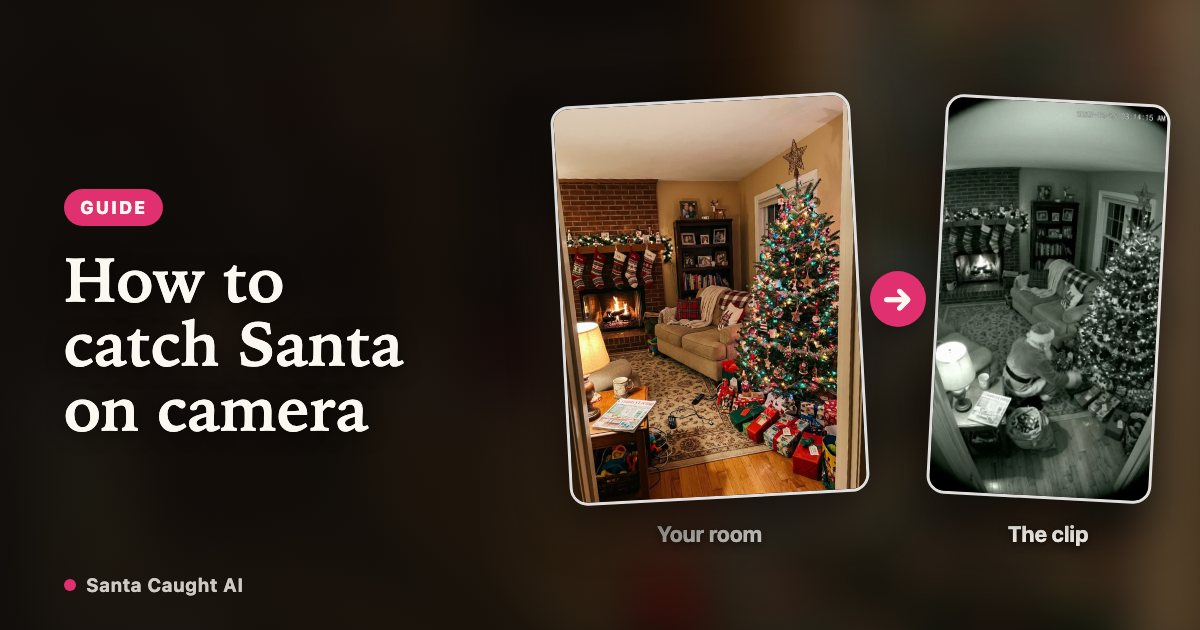
Every December, the same question goes round parenting groups: how do you get something on camera that looks like Santa was actually in the house? This guide walks through the four realistic options, what each one takes, and why the footage that convinces a seven-year-old is almost never the sharpest footage.
See this camera look in motion
Why this is suddenly a question every December
Two things changed. Homes filled up with cameras — video doorbells, indoor cameras, baby monitors — so children grew up knowing that the house records itself at night. And short-video apps filled up with clips of exactly that: a dark hallway, a timestamp in the corner, a figure in red crossing the frame for two seconds.
That combination is what makes the footage land. A child who has seen the doorbell notification on a parent’s phone already believes the camera is real and already believes it catches things nobody was awake for. Santa on that camera is not a cartoon; it is the same system that catches the delivery driver.
Option 1: point a real camera at the tree
If you already own an indoor camera, you can record the living room on Christmas Eve and have a willing adult walk through the shot in costume. It is the most honest option and the footage is genuinely yours.
The problems are practical. You need a costume that reads correctly in low light, a house where nobody wakes up, and a camera angle that does not show the front door someone obviously walked in through. Most families try it once and discover the hardest part is that the person in the suit is recognisable: the walk, the height, the slippers.
Option 2: a sticker app
The oldest approach is an app that overlays a pre-filmed Santa onto your own video. They are cheap, instant and have been around for a decade.
They also give themselves away. The overlay was filmed in a studio with different lighting, so the edges are sharp where your room is soft, the shadow falls the wrong way and Santa is lit from a direction no lamp in your house points from. Younger children do not care. Children around six and up tend to notice the cut-out before you finish asking what they think.
Option 3: edit it yourself
With a free editor and a green screen you can composite a figure into real footage of your room, match the grade and add grain. Done carefully, this produces the best result of all four options.
It also takes an evening, a green screen, a performer and some skill at colour matching — which is why almost nobody does it twice.
Option 4: generate it from a photo of the room
This is what Santa Caught AI does. You upload one photo of the room where the presents go. The model rebuilds that room the way a wall-mounted camera would see it at night, puts Santa in it, and renders a short clip with night-vision grain and a timestamp in the corner.
Nothing has to be filmed, nobody has to be photographed, and because the output is deliberately low-fidelity — monochrome, noisy, fixed frame — it does not have to survive the scrutiny that a sharp, well-lit video invites.
| Approach | Time | Needs | Weak point |
|---|---|---|---|
| Real camera | An evening | Camera, costume, a sleeping house | The person is recognisable |
| Sticker app | Minutes | A phone | Studio lighting over your room |
| Hand-made edit | An evening or two | Green screen, editor, patience | Skill |
| Santa Caught AI | Minutes | One photo of the room | The room photo has to be a good one |
How to photograph the room so it works
The room photo decides almost everything about the result, and it takes thirty seconds to get right. Stand in a corner of the room, hold the phone at head height or a little above, and frame it wide: the tree, the fireplace or sofa, and a good stretch of floor where someone could walk.
Leave the lights on. A dark photo gives the model less to work with, and it converts the picture to night vision anyway. Keep people and pets out of the frame — uploads containing people are rejected — and move anything that blocks the middle of the room, because that is where the figure has to stand.
What actually makes it believable
Children do not check resolution. They check whether the room is theirs. The moment that lands is recognising the actual tree, the actual rug, the actual stocking on the actual hook — which is why a generic Santa clip never works and a mediocre render of your own living room does.
After that it is the format. A fixed frame with no pans or zooms, a timestamp reading a few minutes before midnight, infrared monochrome and visible grain all say "this was recorded, not filmed". The imperfections are the point: that is what camera footage looks like.
Where to stop
Keep it to your own family and the people you would tell the rest of the story to. An AI-generated clip should never be presented as real footage to a platform, an insurer, the police or a news outlet, and it should not be used to make a child afraid of being watched.
The file carries a machine-readable AI label, and any page you share it from says it is AI-generated. That is deliberate: the story is for Christmas morning, not for anybody’s evidence.
FAQ
Do I need a real security camera?
No. The render only needs a photograph of the room. If you do own a camera, you can photograph the room from roughly where it is mounted so the angle matches your real footage.
Can I upload a photo with my children in it?
No. Photos containing people are rejected at upload, and photos of children are never accepted. The video is about the room and the figure walking through it.
Will it look like my living room?
The render is built from your photo, so the layout, the furniture and the decorations come from it. The picture is converted to night-vision monochrome, so colours are not preserved.
Christmas Eve, 11:58 PM, your living room
Create my video