Santa Caught on Camera – in Your Own Living Room
Upload one photo of the room where the presents go. You get back a short security-camera clip of Santa in that exact room: your tree, your sofa, your fireplace, with a timestamp in the corner. You never upload a photo of a person.
Create your video
1Your room photo
Best results: the whole room from a high corner, tree and fireplace in frame, lights on so the furniture is visible. Keep people and pets out of the shot.
2Camera look
3Length
Every sample clip here is a real render from this tool, made from the example room photos shown — not customer footage.
The catch
Why most Santa footage falls apart in front of a child
Sticker apps give it away
A sharp, well-lit Santa pasted over a phone video looks like a sticker, because that is what it is. Children spot the cut-out edges straight away.
A real camera needs a real Santa
Dressing someone up and filming the living room at midnight means a costume, a quiet house and a shot nobody recognises you in.
The questions start around six
Older children ask where the footage came from, why the quality is so good and why the camera happened to be pointing at the tree.
Side by side
Filming it yourself vs. using Santa Caught AI
| Doing it yourself | With Santa Caught AI |
|---|---|
| Borrow a costume and wait until the house is asleep | Upload a photo of the room, any time of year |
| Set up a camera that frames the tree | The render is framed like a wall-mounted camera |
| Explain why the picture looks like a home video | Night vision, grain and a timestamp in the corner |
| Edit and export before Christmas Eve | Download a finished MP4 in a few minutes |
How it works
How to catch Santa on camera in 3 steps
- 1
Photograph the room
Stand in a corner, hold the phone high and get the tree, the fireplace and the floor in one shot. JPG, PNG or WebP up to 10 MB, with nobody in the picture.
- 2
Pick a camera look and a length
Black-and-white night vision or low-light colour, 6, 12 or 18 seconds. One credit covers one second of video.
- 3
Generate and download
The render finishes in a few minutes. Download the MP4 without a watermark and put it on the family TV on Christmas morning.
Made with Santa Caught AI
One room photo in, one camera clip out
No editing app, no green screen, nobody has to dress up. Upload the room, pick a camera look and a length, and the render puts Santa into that room as if the camera had been running all night.
Night vision · Black-and-white infrared, Santa leaving presents by the tree.
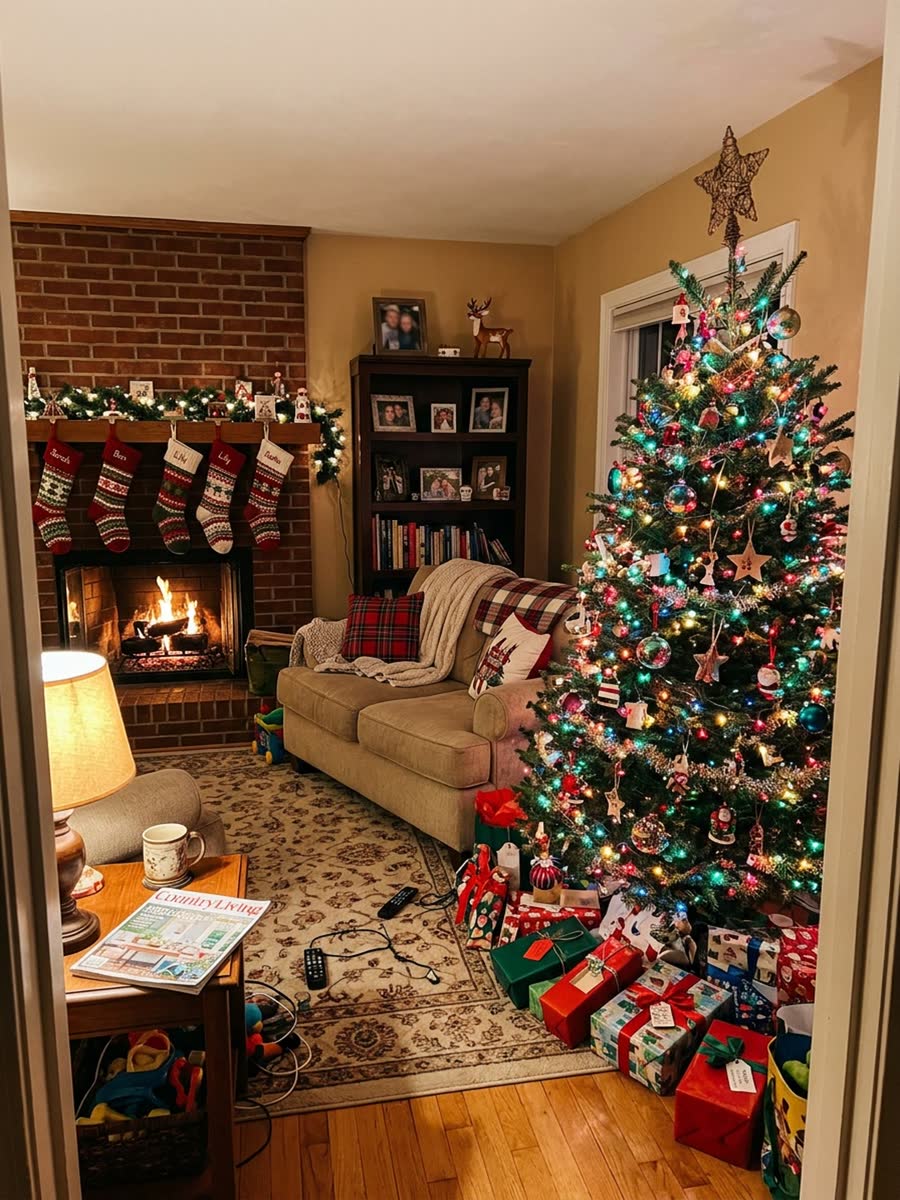
What the camera "recorded"
Colour cam · Low-light colour footage, Santa taking a cookie and shushing the lens.
What the camera "recorded"
About the trend
What is the Santa Caught on Camera trend?
Every December, clips captioned "Santa Caught on Camera" go round TikTok and family group chats: a wall camera, a video doorbell or a baby monitor appears to pick up a red-suited figure moving through a dark living room at two in the morning. The footage is short, silent and grainy, with a timestamp burned into the corner, and that is exactly why people believe it for a second.
Santa Caught AI is a Santa Caught on Camera AI video generator built around that look. You upload one photo of your own living room — no faces, no people — and the model rebuilds that room as a camera would see it at night, adds Santa and renders a Santa Caught on Camera video that matches your furniture, your tree and your fireplace. Night vision, sensor grain and the timestamp do the rest.
Read the full Santa Caught on Camera trend guideAt a glance
Santa Caught AI specs
- Input
- One photo of a room, JPG, PNG, WebP up to 10 MB
- People in the photo
- Not accepted — rooms only, no adults, no children, no pets
- Camera looks
- Night vision, Colour cam
- Video length
- 6, 12, 18 seconds
- Output
- Vertical 9:16 MP4, no watermark, no added music
- Price
- 1 credit = 1 second of video; packs from $4.99 for 6 credits
- Free credits
- None
- Credits
- Never expire, no subscription
- Render time
- A few minutes
- Failed renders
- Credits refunded automatically
Features
What makes a Santa Caught on Camera video believable
Your room, not a stock room
The render is built from your photo, so the tree, the sofa and the fireplace are the ones your family will recognise on Christmas morning.
Shot like a wall camera
Fixed frame, wide-angle corner view, no pans or zooms — the things a phone video never gets right.
Night vision, grain and a timestamp
The picture is monochrome and noisy with the date burned into the corner, the way a real security camera records after dark.
Nobody has to be photographed
You only ever upload an empty room. No faces, no children, no costumes.
Private by default
Uploads are stored privately, used only for your render and deleted automatically 7 days after upload.
Fair billing
Credits never expire. If a render fails, the credits go straight back to your balance.
Ideas
What people make with it
Christmas morning "proof"
Play the clip on the TV before the presents are opened. It is the kind of Ring camera Santa footage a family watches twice, then once more in slow motion.
Try it with a photo of your roomA security camera Santa video for the group chat
Send a security camera santa video to the grandparents at midnight with nothing but "look what the camera picked up".
Try it with a photo of your roomAdd Santa to my living room photo
The most common request we see is simply "add santa to my living room photo" — one upload, and the room you decorated this year is the set.
Try it with a photo of your roomPricing
Pay once, use whenever
1 credit = 1 second of video. No subscription, no expiry.
One clip
Just the one video
$4.99
6 credits
Makes 1 × 6s video
- Credits never expire and stack up
- All video lengths
- HD MP4 download, no watermark
- Automatic refund on failed renders
Starter
A couple of takes to pick from
$9.90
20 credits
Makes 1 × 18s or 3 × 6s videos
- Credits never expire and stack up
- All video lengths
- HD MP4 download, no watermark
- Automatic refund on failed renders
Family
Both camera looks, every room
$19.90
60 credits
Makes 3 × 18s or 10 × 6s videos
- Credits never expire and stack up
- All video lengths
- HD MP4 download, no watermark
- Automatic refund on failed renders
Everyone
One for each household
$29.90
100 credits
Makes 5 × 18s or 16 × 6s videos
- Credits never expire and stack up
- All video lengths
- HD MP4 download, no watermark
- Automatic refund on failed renders
Prices in USD. Taxes are calculated at checkout by our payment partner. One-time purchase — there is no subscription and nothing renews.
What is Santa Caught AI?
Santa Caught AI is a Santa Caught on Camera AI video generator. You upload one photo of a room in your home and it renders a short clip of Santa in that room, filmed in the style of a home security camera. It is the fastest way to answer "how to catch santa on camera" without owning a camera or filming anything.
The full guide to catching Santa on cameraWhich photo works best?
One landscape photo of the room, taken from a high corner so the tree, the fireplace and a good stretch of floor are all in frame. Lights on, nothing blocking the middle of the room. Do not upload photos with people or pets in them — those are rejected.
Room photo tips for a better Santa Caught on Camera videoDo I upload a photo of my child or of myself?
No. We only accept photos of rooms. Photos of people are rejected at upload, and we never accept photos of children. The clip is about the room and the figure walking through it, not about anyone in your family.
Is there a Santa Caught on Camera app?
Santa Caught AI runs in the browser on a phone, tablet or computer, so there is no app to install and nothing to update. Sign in, upload the room photo, download the MP4.
How this compares with sticker-style Santa appsCan I try Santa Caught on Camera free?
There is no free trial: every render costs real GPU time, so there are no free credits. The smallest pack is $4.99 for one 6-second video. Credits never expire and stack up, so nothing is lost if you buy a small pack first, and a render that fails refunds its credits automatically. There is no subscription and nothing renews.
How long does a render take?
Most videos finish in 2–8 minutes depending on length and queue. You can close the page; finished videos wait in My videos.
How do credits work?
Each second of video costs one credit. Credits are bought in packs, never expire and are refunded automatically if a render fails.
Can I use a photo of someone else’s home?
Only if you are allowed to photograph it — for example a relative’s living room you are making the video for. Photos containing people, including photos of minors, are not accepted at all, and accounts that keep trying are closed.
What happens to my photos?
Uploads are private, used only to make your video and deleted automatically 7 days after upload. Finished videos are kept for 30 days after they finish. Deleting your account removes everything right away.
Should I tell my child the video is AI?
That is your call, and it is the part worth thinking about before Christmas morning. The file is labelled as AI-generated in its metadata and on any page you share it from, so an older child who looks will find it. Many parents treat it the way they treat the rest of the story, and tell them later.
What to say when they ask if it is realChristmas Eve, 11:58 PM, your living room
Upload one photo of the room, pick a camera look and have the footage ready before anyone wakes up.
Create my video · $4.99+